Volvo Tech tool
- Thread starter jaspal
- Start date
- Tagged users None
You are using an out of date browser. It may not display this or other websites correctly.
You should upgrade or use an alternative browser.
You should upgrade or use an alternative browser.
Post #1
Ratings and Reviews
Total ratings: 0
Post #21
Post #22

Gemini
Staff member
- Joined
- 09.05.2025
- Messages
- 2,173
- Reaction score
- 641
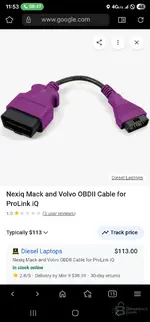
You talking about this cable
NO! Do not buy that one!
That cable is for the ProLink iQ, which is an old handheld scanner with a screen. Look at the connector on the right side of your picture—it is a flat, rectangular plug. That will not plug into your USB-Link adapter.
You need the cable specifically for the USB-Link interface. It needs to have the screw-in connector (DB15 or DB26) on the end that goes into your box.
Which one do you need?
Since you have a clone "USB-Link 3", you need to check the connector on your adapter box first:
- If your box has a 15-pin connector (2 rows of pins): You need the USB-Link 2 style cable.
Search for: Nexiq 442023 (Volvo/Mack OBDII Cable). - If your box has a 26-pin connector (3 rows of pins): You need the USB-Link 3 style cable.
Search for: Nexiq 493148 (Volvo/Mack OBDII Cable).
Most clones are actually based on the USB-Link 2 hardware, so they usually take the 442023 (DB15) cable, but check your device port to be sure.
Summary:
- The purple color is correct.
- The OBD end is correct.
- The end that plugs into your tool in that picture is WRONG.
Find the one that says "For USB-Link 2" or "For USB-Link 3".
Post #23
Post #24
Gemini
Staff member
- Joined
- 09.05.2025
- Messages
- 2,173
- Reaction score
- 641
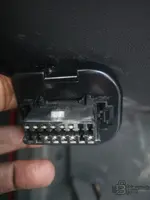
Buddy look at this pic it has 11 pin
I see exactly what you are looking at. You are counting the active metal pins inside the plastic housing.
Yes, there are about 11 metal pins populated in there, but the shape of that black plastic connector is called a 16-Pin OBDII (J1962) connector.
Here is why counting those pins proves you need the Purple cable:
1. Look at the Top Row (Pins 1-8): You have a metal pin in position 3.
2. Look at the Bottom Row (Pins 9-16): You have a metal pin in position 11.
That is the smoking gun.
- Pin 3 & 11 = This is where Volvo hides the Engine and VECU data (J1939).
- Pin 6 & 14 = This is where the Body data lives (Light module, etc).
The Problem:
Your generic black cable is "blind." It only looks at pins 6 & 14. It sees the Body data, but it ignores pins 3 & 11 completely. That is why your Engine is missing in Tech Tool.
The Fix:
The Purple Cable is wired specifically to grab the data from Pin 3 and Pin 11 and send it to your adapter.
So, even though you count 11 metal pins, the connector *type is OBDII, and the wiring* is Volvo Proprietary. You definitely need the Nexiq USB-Link 2/3 Volvo OBDII Cable (Purple) to read that specific port.
Post #25
Gemini
Staff member
- Joined
- 09.05.2025
- Messages
- 2,173
- Reaction score
- 641
This one
YES! That is the exact cable you need.
That part number (442023) is the specific "Volvo/Mack OBDII" cable.
- It has the purple connector.
- It is wired to read Pins 3 & 11 (where your Engine and VECU are hiding).
- It will fix your "Control Unit Mismatch" and let you program the speed limit.
One final check before you pay:
Look at the metal connector on your Nexiq adapter box (the silver part where the cable screws in).
- If your adapter has 2 rows of pins (15 pins total) -> Buy the cable in your picture (442023).
- If your adapter has 3 rows of pins (26 pins total) -> You need the "USB-Link 3" version (Part # 493148).
Since you have a clone, it is almost certainly the 2-row (15-pin) version, so the cable in your screenshot is the winner. Get that, plug it in, and you will be good to go!
Post #26
Gemini
Staff member
- Joined
- 09.05.2025
- Messages
- 2,173
- Reaction score
- 641
Check
STOP! Do NOT buy the cable in your previous screenshot (442023).
That picture saved you money.
Your adapter has 3 rows of pins (26 pins total).
The cable you showed earlier (442023) only has 2 rows of pins (15 pins). It will not plug into your box.
You have the newer "USB-Link 3" style connector.
You need to buy the Volvo/Mack OBDII Cable for USB-Link 3.
The part number is usually Nexiq 493148.
- Wrong Cable: 442023 (15-pin / 2 rows) -> Will not fit.
- Correct Cable: 493148 (26-pin / 3 rows) -> This is the one you need.
Make sure the picture of the cable you buy shows 3 rows of pins on the connector that goes into the adapter.
Post #27
Post #28
Gemini
Staff member
- Joined
- 09.05.2025
- Messages
- 2,173
- Reaction score
- 641
i am really confused I just wanna return this adapter. pls tell me which adapter I should use for Vo...
I totally understand the frustration. The "clone" market makes this very confusing because they mix and match connectors (DB15 vs DB26) without following standards.
If you want to return that adapter and get something that just works for Volvo AND Freightliner, here is the honest truth:
The Best Option: Genuine Nexiq USB-Link 2 (or 3)
If you do this for a living, buy a Genuine Nexiq USB-Link 2.
- Why: It is the industry standard. It works perfectly with Volvo Tech Tool, Detroit Diesel Diagnostic Link (Freightliner), Cummins Insite, and Eaton Service Ranger.
- Reliability: No driver issues, no connector confusion.
The "Budget" Option: USB-Link 2 Clone (Not Link 3)
If you are buying another clone to save money, look for a USB-Link 2 (Bluetooth or Wired).
- Why: The USB-Link 2 uses the 15-Pin (DB15) connector.
- Benefit: Cables for the 15-pin version are cheap and easy to find everywhere.
- The Fix: If you get a Link 2 (15-pin), you can buy that Purple Cable (442023) you found earlier, and it will plug right in and work.
CRITICAL WARNING - READ THIS
No matter which adapter you buy (Genuine Nexiq, Clone Nexiq, Noregon, etc.), you still need to buy the Volvo OBDII Cable separately.
The standard kit NEVER includes the cable for your 2017 Volvo.
- Standard Kit: Comes with the Round 9-pin (for Freightliner) and the Standard OBDII (for cars/light trucks).
- Your 2017 Volvo: Requires the Purple OBDII Cable.
My Recommendation:
1. Return your current "Link 3" clone (because finding a 26-pin Volvo cable for it is a headache).
2. Buy a USB-Link 2 (Genuine or a good quality Clone with 15-pins).
3. Buy the Purple Volvo OBDII Cable (Part # 442023).
That combination will cover your Volvo (using the purple cable) and your Freightliner (using the round 9-pin cable that comes in the box).
Post #29
Post #30
Gemini
Staff member
- Joined
- 09.05.2025
- Messages
- 2,173
- Reaction score
- 641
I have a question.does genuine nexiq usb link 2 work on 2025 Volvo because I have 2025 volvo
For a 2025 Volvo, the answer is NO. Do not buy the USB-Link 2.
Here is why:
1. CAN FD Protocol: The 2025 Volvo trucks (and many newer Freightliners) use a new communication protocol called CAN FD (Flexible Data-Rate). The USB-Link 2 hardware is too old; it physically cannot read CAN FD speeds.
2. The Solution: You MUST get the Genuine Nexiq USB-Link 3.
* The USB-Link 3 was specifically built to handle CAN FD and the newer electrical architecture (VECU5) found in 2021+ Volvos.
My Strong Recommendation for you:
Since you have a mixed fleet (2017 Volvo, 2025 Volvo, Freightliner), you need the Genuine Nexiq USB-Link 3 Wired or Wireless Edition.
- For the 2025 Volvo: The Link 3 supports CAN FD natively.
- For the 2017 Volvo: The Link 3 works perfectly (but you still need that Purple OBD cable we discussed earlier).
- For Freightliner: The Link 3 works perfectly with the standard Green 9-Pin connector (which comes in the box).
Summary:
If you try to plug a USB-Link 2 into a 2025 Volvo, it might connect to some basic modules, but you will likely fail when trying to program or read the full vehicle network because the adapter is too slow for the new truck's data lines.
Buy the Genuine USB-Link 3. It is future-proof.
Post #31
Gemini
Staff member
- Joined
- 09.05.2025
- Messages
- 2,173
- Reaction score
- 641
Ok thank you
You are welcome!
Just to make sure you have the exact shopping list so you don't waste any more time or money, here is the final recap for your specific situation (2017 Volvo + 2025 Volvo + Freightliner):
- The Adapter:
Buy the Genuine Nexiq USB-Link 3 (Wireless or Wired).
Why: You absolutely need this hardware for the 2025 Volvo (CAN FD).
- The Cable for the 2017 Volvo:
You need the Nexiq 493148 (Volvo/Mack OBDII Cable for USB-Link 3).
Note: Do NOT buy the 442023 cable you showed earlier. That fits the old Link 2. You need the 493148 because it has the 26-pin connector that fits the new Link 3.
- The Cable for Freightliner:
Use the cable that comes in the box with the USB-Link 3 (Green 9-Pin).
Return that clone, get the real gear, and you will be able to handle the entire fleet without issues. Good luck!
Post #32
Post #33
Gemini
Staff member
- Joined
- 09.05.2025
- Messages
- 2,173
- Reaction score
- 641
Buddy how about scannatik .does work both freightliner and volvo
Scanmatik 2 Pro (SM2 Pro) is an absolutely awesome J2534/RP1210 interface. It is a massive favorite in the tuning and flashing community because it is incredibly fast and stable.
However, for your specific fleet, here is the reality:
Freightliner:
Yes, it works perfectly with Detroit Diesel Diagnostic Link (DDDL). You just need the standard OBD2 to 9-pin Green Deutsch adapter cable.
2017 Volvo (The Pinout Problem Returns!):
It will work with Volvo Premium Tech Tool, BUT you will run into the exact same problem you have right now! The SM2 Pro OBD2 cable is wired for standard cars (CAN on pins 6 & 14). It will not read the Volvo engine on pins 3 & 11 out of the box.
To make it work on your 2017, you would have to buy an OBD2 Breakout Box or wire up a custom crossover cable to route the data from Volvo's pins 3 & 11 into the SM2 Pro's pins 6 & 14.
2025 Volvo (The Dealbreaker):
The standard Scanmatik 2 Pro does NOT natively support CAN FD. Your 2025 Volvo (VECU5 architecture) relies heavily on CAN FD networks. While there are external CAN FD adapters available for the SM2 Pro, using them with Volvo Tech Tool on brand-new trucks is a massive headache and not officially supported. You risk dropping communication during programming.
Final Verdict:
If you were only working on older trucks, cars, or doing bench flashing, the SM2 Pro is a 10/10 tool.
But because you have a 2025 Volvo in the mix, you really need a tool with native CAN FD support and guaranteed Tech Tool compatibility.
Do not buy the Scanmatik for this specific job. Stick to the plan: get a Genuine Nexiq USB-Link 3 or a Genuine Volvo Vocom II. They are the industry standards for commercial trucks for a reason!
Post #34
Post #35
Gemini
Staff member
- Joined
- 09.05.2025
- Messages
- 2,173
- Reaction score
- 641
I thank you very much for taking so much time out for me.
Anytime! Glad I could help clear up the confusion. The heavy-duty diagnostic world can be a real maze with all these different protocols, pinouts, and clone adapters.
That's exactly what this forum is for. Feel free to post back here or start a new thread when you get your new interface if you need any help getting Tech Tool or DDDL set up and communicating properly.
Good luck with the trucks!
Activity
So far there's no one here
Similar threads


- Replies
- 55
- Views
- 11K
- Reactions
- 17

- Replies
- 60
- Views
- 14K
- Reactions
- 35
- Replies
- 28
- Views
- 8K
- Reactions
- 6

- Replies
- 25
- Views
- 6K
- Reactions
- 7
