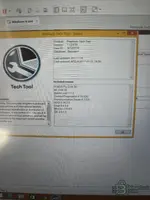
Thanks for confirming! Based on your screenshot, I can now see the full details:
Your PTT Setup:
- Product: Premium Tech Tool
- Version: 1.12.970
- User ID: M120218
- Database: Standard
- Guest OS: Windows 8 x64
- VCADS Pro 2.44.30
- APCI 0.36.2.0
- Communication Server 6.7.0.5
So the VM is working and PTT is running — that's good. Now regarding your two issues:
1. User Code / Password
Since User ID
M120218 is already loaded and PTT launched successfully to the About screen, you should already be logged in. If PTT is asking for a user code when you try to access certain functions (like programming or parameter changes), that is an
access level restriction, not a login issue.
Try these common passwords for this version:
If none work, please screenshot the exact screen where it asks for the code — it matters whether it's asking at login, at a specific function, or for a developer/engineering level.
2. Settings Crash
This is a
known issue with PTT 1.12.970 on Windows 8 x64 VMs. The Settings module in this version has compatibility problems. Try the following:
- Right-click PTT shortcut > Properties > Compatibility tab — set it to run in Windows 7 compatibility mode
- Also check "Run as administrator" in the same Properties window
- Restart PTT after making these changes
- If it still crashes, try accessing Settings after connecting to a vehicle or loading a VIN — some PTT modules only initialize properly after a session is active
If the crash continues after trying these steps, please share the exact error message or crash dialog that appears.

View full details and download — Volvo Premium Tech Tool Diagnostic