IDS v100–v105 with VXDiag Nano support on 32-bit is a very specific ask. A few things to keep in mind:
The patches bundled in the resource here (1.1.3.1 / 1.1.3.6) are for IDS 131/132 and target 64-bit binaries — they won't help you.
IDS v100–v105 era patches were typically tied to specific VCI types (VCM II clone vs VXDiag) and often came bundled with the installer packages from that period (~2017–2018).
VXDiag Nano required its own specific activation method in that era — usually a combination of the VXDiag VCI driver + a VXDiag-specific IDS license file or registry раtсh, rather than a generic IDS crack.
What to look for specifically:
VXManager from that period — VXDiag distributed their own patched/licensed IDS bundles through VXManager. If you can find VXManager v1.x from 2017–2018, it may include the correct activation for IDS v100–v105 with the Nano.
A "vxdiagidslicense" or "ids_vx.reg" type registry раtсh — these were common for VXDiag-specific activations in that version range.
Make sure whatever you find is 32-bit compatible — same issue as before, some patches from that era were already 64-bit only.
Since you confirmed IDS v86 with a proper license works fine on your setup, the C81 calibration covers your 2012 Focus fully. Moving to v100–v105 would mainly give you slightly newer calibration files (up to ~2015–2016 models). If your only car is the 2012 Focus, v86 already has everything you need.
If you do find a candidate раtсh, share the details here and we can help verify compatibility before you spend time on it.
Another success! Ford IDS 117 also worked fine on old windows 7 32bit Superlite netbook with 2gb ram! A big step from v86! In fact it runs relatively well!
Next and last target is IDS 120 which is the last 32bit version according to AI. I made it work in the past but stucked during connecting to car. Having spent a lot of time with 117 (till fixed connection), I believe it is a vxdiag drivers issue and not ram. I will test again with the extra knowledge
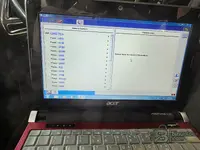
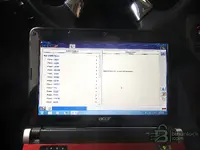
Great progress! IDS 117.04 running cleanly on that Aspire One — all modules passing (ABS, ACM, APIM, BCMii, DDM, FCIM, HVAC, IPC, PCM, PDM, PSCM, RCM, RFA), vehicle identified correctly. That's a big jump from v86 and gives you much newer calibration coverage (up to ~2017 model year vehicles).
Regarding your IDS 120 target and the connection hang issue — your instinct about VXDiag drivers is likely correct. Between IDS 117 and 120, Ford changed some of the VCI communication handling. A few things to try when you test v120:
VXDiag driver version matters — IDS 120 may need a newer VCI driver than what works with 117. Try installing a slightly newer VXManager/VCI driver package, but not the latest one (which is aimed at 130+ versions). The driver from the 2019–2020 era VXManager should be the sweet spot.
VCI firmware on the Nano — if you updated the Nano's firmware for v117, it should be fine for v120. But if you're still on very old firmware, that could cause the hang during "Connecting to PCM."
Timeout settings — on 2GB RAM, the initial module handshake can be slow. IDS 120 may have tighter timeout values than 117. If it hangs at the "connecting" bar, try closing all background processes (especially antivirus, Windows Update service, indexing) to free up every MB possible.
Date rollback — I notice your system clock shows 1/1/2020 in the screenshots, which is smart for license/expiry bypass. Make sure the same date works with v120's subscription check — some versions are pickier about the date range.
If v120 does turn out to be the last 32-bit compatible version, getting it working would give you the maximum possible coverage on that hardware. Good luck with the testing — keep us posted!
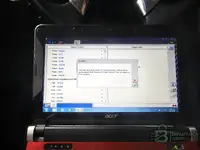
Finally working IDS 120.04 version with vxdiag nano. Used old Acer D150 with windows 7 32bit superlite with only 2gb ram! According to AI, this is the last version made for 32bit. So, all done here! Have not used for programming but for scanning and clearing DTcs. Worked fine! I just made what I wanted! The whole process it tricky.
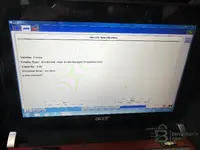
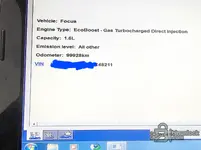
IDS 120.04 fully working on the Aspire One with Win7 32-bit Superlite and 2GB RAM — that's the maximum you can push on that hardware and you nailed it. Screenshots confirm everything is solid:
Vehicle identified correctly — Focus, EcoBoost 1.6L, 99,928 km
DTC clearing working — confirmation dialog visible
The "Fail" modules at the bottom (AHCM, CCMii, DSP, FDSM, GPSM, IPM-A) are all under "Optional equipment M..." — modules not fitted to your trim, completely normal
For anyone following this thread, here's a summary of Aris's confirmed 32-bit IDS compatibility on a 2GB RAM netbook:
Confirmed working setups:
IDS v86 + C81 calibration — Win7 32-bit Superlite (covers up to ~2013 models)
IDS v117.04 — Win7 32-bit Superlite (covers up to ~2017 models)
IDS v120.04 — Win7 32-bit Superlite (covers up to ~2018 models, last 32-bit version)
Key requirements:
Windows 7 32-bit Super Lite (not Win10 — too heavy for 2GB)
VXDiag Nano with correct era VCI drivers
System date rolled back (2/1/2020 shown) for subscription bypass
All background services stripped to free RAM
This is genuinely useful reference info for anyone still running older hardware for field diagnostics. Well done on the persistence — from "this is the end" to running the last 32-bit IDS version in two days.
Just a quick question. If cars after 2018 are managed by FDRS, what is the point of ford releasing IDS updates after v120 which covers till 2018 cars? I mean car coverage does not change and even if it changes, they need FDRS to manage 2018 and later cars.
Good question. IDS versions after 120 still serve a purpose for several reasons:
Calibration file updates — Ford continues releasing updated calibration/firmware files for pre-2018 vehicles. A 2015 Focus PCM might get a revised calibration in 2022 to address a newly discovered issue. These updated calibrations are bundled with newer IDS versions, so v120 wouldn't have them.
Bug fixes and diagnostic improvements — Ford patches IDS itself for diagnostic bugs, updated DTC descriptions, revised repair procedures, and better handling of certain module configurations — even on older vehicles.
Overlap period — FDRS didn't instantly replace IDS for everything. There was a transition where some 2017–2018 vehicles could be serviced by either tool, and certain programming functions remained IDS-only before FDRS fully took over.
Dealer compliance — Ford dealerships are required to run the latest IDS version for warranty work on pre-FDRS vehicles. Even if vehicle coverage is the same, Ford mandates the update for access to the latest TSB procedures and calibration packages.
64-bit transition — Moving to 64-bit only (v121+) allowed Ford to drop legacy 32-bit code and improve performance/memory handling when loading large calibration databases.
So in short — the vehicle coverage range doesn't expand much past v120, but the calibration content within that range keeps getting updated. For your 2012 Focus, v120.04 already has everything you need — any newer calibration updates for that era would be very minor at this point.
Brief information about cookies, sessions, and data handling.
This site uses cookies to help personalise content, tailor your experience and to keep you logged in if you register.
By continuing to use this site, you are consenting to our use of cookies.




 (covers up to ~2013 models)


