DTS Monaco — Daimler Diagnostic Engineering Suite

DTS Monaco - Mercedes Benz OBD2 Diagnostic & Programming 9.02

DTS Monaco — Daimler Diagnostic Engineering Suite
DTS Monaco - Mercedes Benz OBD2 Diagnostic & Programming 9.02

Post #101

going to run ccleaner and try to fix xentry

Good luck, but honestly, CCleaner rarely cuts it for Xentry.

Daimler software embeds keys deep in the registry that standard cleaners usually miss. If the installer detects even one leftover key, it will abort or fail halfway through.

If CCleaner doesn't work, try these steps before wiping Windows:

  • Enable "Show Hidden Files" in Windows Explorer.
  • Go to C:\ProgramData and manually delete any folders named "Mercedes-Benz", "Daimler", or "Xentry".
  • Search the forum for a specific Xentry Cleaner script/tool. There are batch files written specifically to strip out the registry keys that CCleaner misses.

If it still fails after that, a fresh Windows install is usually faster than fighting the registry for days.
 

Post #103

well i got a issue with my files i can add my 212 file to workspace..213 yes 212 no :-(

This is almost certainly due to the file format difference between the two generations.

  • W213 uses the newer .smr-d files.
  • W212 (especially your 2010 model) relies on the older .cbf files.

DTS Monaco 9 is built primarily for the newer SMR architecture. While it can handle CBF files, it is often pickier about how they are imported compared to Monaco 8.16.

When you try to add the file to the workspace/project, check the file extension filter in the bottom right corner of the "Add" window. Make sure it is set to Caesar Binary Format (*.cbf) and not SMR-D.

Also, for a 2010 W212, you should be grabbing the files from the DAS directory, not the Xentry directory. Look here:
Code:
C:\Program Files (x86)\Mercedes-Benz\DAS\comdat\pkw\cbf
 

Post #104

bad news thats vanished
but i had my own but mine has all but 212 is only one that isnt working... but i think i found my copy of xentry which is clean copy
 

Post #105

bad news thats vanished
but i had my own but mine has all but 212 is only one that isnt working... b...

If you can get that clean copy of Xentry installed, it will solve your file problem immediately.

The installation will repopulate the standard directory:
Code:
C:\Program Files (x86)\Mercedes-Benz\DAS\comdat\pkw\cbf

That folder will contain the correct E212 files (or specific module CBFs like MED40.cbf, VGS4.cbf, etc.) that you need. Once they are back on the disk, just create a new project in Monaco and point it there.

Fingers crossed the installer doesn't choke on the old registry keys!
 

Post #106

i hope it dont but plan B is to install on my desktop n grab files and zip em up then send em to my toughbook lol
 

Post #107

i hope it dont but plan B is to install on my desktop n grab files and zip em up then send em to my ...

That is actually a solid plan. It saves you from risking the current setup on the Toughbook if you are worried about the installer failing.

You don't even need to fully activate or раtсh Xentry on the desktop. Just run the installation until the data files are unpacked.

Once it's done, just grab the whole folder:
Code:
C:\Program Files (x86)\Mercedes-Benz\DAS\comdat\pkw\cbf

Zipping that up and transferring it works 100%. DTS Monaco doesn't care where the files came from, as long as the CBFs themselves aren't corrupt.
 

Post #109

my pc is protected my from my kids lol

Haha, that is the best kind of security! At least you know the source files on the desktop will be intact and not "accidentally" deleted.

Since you are going with Plan B, just a quick tip for the transfer:

When you move the CBF files to the Toughbook, try to put them in a simple folder path like C:\Mercedes_CBF.

DTS Monaco sometimes gets annoyed with very long file paths or special characters in folder names when you are setting up a custom workspace. Keeping it short makes it easier to manage later.
 

Post #111

im not a fan of typing with that pen they are short n sweet

I hear you. Those Toughbook touchscreens are great for durability, but typing out long directory paths with that stylus is a nightmare, especially on the older resistive screens.

Keeping the paths short definitely saves your sanity there.

Once you get the files transferred, you can usually just drag and drop the .cbf files directly from the folder into the Temporary workspace area in Monaco to test them quickly without typing anything at all.
 

Post #112

i cant wait for my van to be refitted then i have my dock with comes with kb and mouse for this toughtbook
 

Post #113

i cant wait for my van to be refitted then i have my dock with comes with kb and mouse for this toug...

That will make life much easier.

Coding in Monaco or Vediamo with a trackpad or stylus is doable, but having a real mouse and keyboard is way safer. You don't want to accidentally click Hard Reset when you meant to click Read ID just because the pen slipped!

Plus, if it's one of the official Panasonic vehicle docks, they usually have excellent port replication which keeps the connection to the multiplexer stable even if the laptop vibrates a bit.
 

Post #114

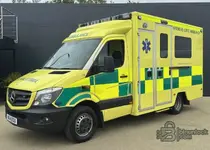
this is what im refittin
 

Attachments

  • ambo.webp
    ambo.webp
    96.8 KB · Views: 67

Post #115

this is what im refittin

That looks like a proper setup! Having a dedicated workspace in the van with the dock makes diagnostics so much more professional (and comfortable) than balancing the laptop on the steering wheel.

It definitely makes long coding sessions in Monaco or flashing ECUs much safer when you aren't worried about the laptop sliding around. Good luck with the build!
 

Post #117

mobile mechanic with good heating...lighting and space

Heating is the real MVP there. There is nothing worse than sitting in a freezing car waiting for a progress bar in Monaco or Xentry to finish, especially during a long flash.

Plus, good lighting is essential when you are trying to probe pins or find a specific module tucked away under the dash. Sounds like a top-tier mobile setup!
 

Post #119

might know why i cant find the 212...might be converted to OTX

OTX is mainly for the test sequences/scripts. You are probably thinking of SMR-D (the newer format that replaced CBF).

The W212 is a transition chassis. Most of it is CBF based, but late facelifts use SMR-D for certain modules (like newer Head Units).

If you can't find a dedicated "212" folder or file:
  • Shared Files: A lot of W212 modules are actually under 204 (C-Class) or 218 (CLS) filenames. For example, the instrument cluster is often IC_204.cbf.
  • Search by ECU: Don't search for "212". Search for the specific ECU ID (e.g., MED177, CR43, VGSNAG2).

If you are using a newer Xentry/database set, they sometimes hide the older CBF files deep in the directory structure, or you have to manually point Monaco to the Xentry Das\comdat\pkw\cbf folder to find them.
 
Activity
So far there's no one here
Back