BMW FSC Code Generator & Reader (for CIC/NBT Map Activation)

BMW FSC Code Generator - Navigation Maps and Media Activation 1.91

  • Thread starter Thread starter Bin
  • Start date Start date
  • Tags Tags
    bmw fsc
  • Tagged users Tagged users None
BMW FSC Code Generator & Reader (for CIC/NBT Map Activation)
BMW FSC Code Generator - Navigation Maps and Media Activation 1.91
  • Thread starter Thread starter Bin
  • Start date Start date
  • Tags Tags
    bmw fsc
  • Tagged users Tagged users None

Post #1

Bin

Thread Owner
Administrator
Joined
03.05.2025
Messages
1,848
Reaction score
50,806
New release thread for BMW FSC Code Generator & Reader (for CIC/NBT Map Activation): discuss, share feedback, and get help.


BMW FSC Code Generator & Reader (for CIC/NBT Map Activation)​#

Your Complete Toolkit for Generating BMW CIC/NBT Navigation Map FSC Codes.

Stop Paying for Map Updates: The Free FSC Code Reader & Generator.

View attachment 418
View attachment 419

This resource provides a complete software...

Frequently Asked Questions​#

Which Windows version is recommended?
For maximum stability during ECU flashing and diagnostics, a clean installation of Windows 10 (64-bit) is recommended.
Is it compatible with J2534 PassThru?
Most modern software versions support standard J2534 interfaces like Scanmatik 2 Pro, OpenPort 2.0, and specific VCI adapters.

What's inside:
  • Overview & screenshots
  • Version history and compatibility
  • Download link and setup notes

👉 View full details and download — BMW FSC Code Generator & Reader (for CIC/NBT Map Activation)
 
Ratings and Reviews
Total ratings: 0

Post #2

Bin updated BMW FSC Code Generator & Reader (for CIC/NBT Map Activation) with a new update entry:

BMW CIC/NBT/EVO ID4 Map Update Assistant v1.91 (FSC Management)

What’s new in v1.91
  • Added profile refinements for CIC, NBT and EVO ID4 navigation units.
  • Updated map presets and region lists (2024–2025 coverage).
  • Improved “By File” and “By Date” workflows and input validation.
  • Faster FSC code checks and better error reporting.
  • UI polish and minor bug fixes for smoother operation.

[ATTACH type="full" alt="BMW CIC NBT EVO ID4 FSC map update assistant v1.91 interface with By File and By Date options, map type and...​

Read the rest of this update entry...
 

Post #4

How do I like a resource in order to download it ? I don't see a thumbs-up icon
 

Post #5

How do I like a resource in order to download it ? I don't see a thumbs-up icon

Go to the first post in this thread (the resource overview post). Look at the bottom right corner of that specific post. You should see a "Like" link or button there.

Once you click it, refresh the page, and the download button at the top right of the resource page should unlock.
 

Post #8

When I unzip the BMW FSC GENERATOR 1.91 FULL file I only see one .exe file, the FSC generator. I don't see the .exe file to read the information from my iDrive. Do I need to download another file ?
 

Post #9

When I unzip the BMW FSC GENERATOR 1.91 FULL file I only see one .exe file, the FSC generator. I don...

You are correct, they are two separate tools. The generator and the reader perform different functions.

  • The Reader (usually SWID_reader.exe) connects to your car via an ENET cable to download the 1B or DE file.
  • The Generator (BMW_CIC_FSC_Generator.exe) is a Windows application that uses the file from the reader to create the final activation code for your map update.

The SWID_reader.exe should be included in the main download package. Double-check the files you unzipped. Sometimes it's in a sub-folder. If you definitely don't have it, you may need to re-download the resource from the first post and ensure you extract everything from the archive.
 

Post #10

I have downloaded the archive BMW FSC GENERATOR 1.91 again and tried extracting the contents with both WinRar and 7Zip but I still don't see SWID_reader.exe. I used the 'Find' facility in WinRar to search the archive but the file wasn't found.
Is the reader tool available elsewhere ?
 

Post #11

I have downloaded the archive BMW FSC GENERATOR 1.91 again and tried extracting the contents with both WinRar and 7Zip but I still don't see SWID_reader.exe. I used the 'Find' facility in WinRar to search the archive but the file wasn't found.
Is the reader tool available elsewhere ?
?
 

Post #12

Many thanks got the file now.
It looks like the default connection to the car is ethernet OBD adapter. I only have a Bluetooth or USB adapter. The config file seems to suggest PC Bluetooth can work but do I need additional software for this ? Or is easier to get a ethernet OBD adapter.
 

Post #13

Many thanks got the file now.
It looks like the default connection to the car is ethernet OBD adapte...

It depends on which car/head unit you are trying to read.

  • If you have an F-series (NBT/NBT Evo): You must use an ENET (Ethernet to OBD) cable. The SWID_reader tool works by connecting via TCP/IP network protocols, which Bluetooth adapters do not support in this context.
  • If you have an E-series (CIC): You typically use a K+DCAN USB cable. However, for E-series, the method is usually different (often using fsc.exe via command line with Ediabas, rather than the GUI SWID_reader).

Bluetooth adapters are generally designed for mobile apps (like BimmerCode or Torque) and do not handle the specific file transfer protocols required to pull the 1B/DE files on Windows.

I strongly recommend getting an ENET cable. They are very cheap (usually $10-$15) and are the standard tool for any coding or map updates on F-series cars. It will save you a lot of headaches compared to trying to configure a wireless connection.
 

Post #14

I have F22 M240i.
I will source an Enet cable. Many thanks for the advice.
 

Post #15

I have F22 M240i.
I will source an Enet cable. Many thanks for the advice.

Good choice. Since you have an F22, you likely have NBT or NBT Evo. The ENET cable is the only reliable way to pull the data for those units.

One tip for when the cable arrives: Ensure your Windows Firewall and Antivirus are temporarily disabled when you run the reader. They almost always block the network connection to the car's IP address.

Let us know how you get on!
 

Post #16

When I unzip the BMW FSC GENERATOR 1.91 FULL file I only see one .exe file, the FSC generator. I don't see the .exe file to read the information from my iDrive. Do I need to download another file ?

It depends on which car/head unit you are trying to read.

  • If you have an F-series (NBT/NBT Evo): You must use an ENET (Ethernet to OBD) cable. The SWID_reader tool works by connecting via TCP/IP network protocols, which Bluetooth adapters do not support in this context.
  • If you have an E-series (CIC): You typically use a K+DCAN USB cable. However, for E-series, the method is usually different (often using fsc.exe via command line with Ediabas, rather than the GUI SWID_reader).

Bluetooth adapters are generally designed for mobile apps (like BimmerCode or Torque) and do not handle the specific file transfer protocols required to pull the 1B/DE files on Windows.

I strongly recommend getting an ENET cable. They are very cheap (usually $10-$15) and are the standard tool for any coding or map updates on F-series cars. It will save you a lot of headaches compared to trying to configure a wireless connection.
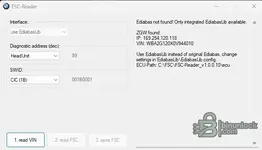
When I connect to my OBD port using an Enet cable and run the FSC-Reader program it connects okay and discovers the VIN but gives the following error:
Ediabas not found! Only integrated EdiabasLib available.
--
Use EdiabasLib instead of original Ediabas, change settings in EdiabasLib\EdiabasLib.config.
--
I've looked at the config file but not sure what I need to change to make it work.
 

Post #17

When I connect to my OBD port using an Enet cable and run the FSC-Reader program it connects okay an...

This is a common issue when you don't have the full BMW Standard Tools suite installed on your laptop. The tool is trying to use its internal driver (EdiabasLib) but it defaults to the wrong cable type (usually USB).

You need to manually tell the configuration file to use the ENET interface.

1. Go to the folder where you extracted the reader.
2. Open the folder named EdiabasLib (or look in the root folder if it's there).
3. Right-click on EdiabasLib.config and choose Open with > Notepad.
4. Look for the line that defines the Interface. It usually looks like STD:OBD or STD:USB.
5. Change that value to ENET.

It should look something like this:

XML:
<Configuration>
    <!-- Other settings -->
    <Interface>ENET</Interface>
    <!-- Other settings -->
</Configuration>

Save the file, close Notepad, and try running the reader again.

If that doesn't work immediately, ensure your Windows Network Adapter for the Ethernet connection is set to obtain an IP address automatically (DHCP), as the car will assign an IP to your laptop.
 

Post #18

My config file seems to be set to ENET for the interface key. I have attached the relevant part of the file and also an image of the FSC-Reader window. My laptop does appear to have got an IP address via DHCP
 

Attachments

  • xml version=1.0 encoding=utf-8.txt
    xml version=1.0 encoding=utf-8.txt
    1.7 KB · Views: 85
  • Screenshot 2026-02-17 154513.webp
    Screenshot 2026-02-17 154513.webp
    14 KB · Views: 72

Post #19

My config file seems to be set to ENET for the interface key. I have attached the relevant part of t...

That message ("Ediabas not found! Only integrated EdiabasLib available") is actually normal if you do not have the full BMW Standard Tools (INPA/NCSExpert) installed. It just tells you that the program is using its own internal driver to talk to the car, which is exactly what we want it to do.

If the VIN is showing up, that means the connection is partially working!

However, if it stops there or fails to read the actual FSC file, try these steps:

  1. Firewall: This is the most common issue. Even if the VIN reads, the file transfer can be blocked. Completely disable Windows Defender/Firewall and any 3rd party antivirus for a few minutes while you try to read.
  2. Run as Administrator: Right-click the .exe and select "Run as Administrator". The tool needs elevated privileges to access the network ports correctly.
  3. Check the Config Syntax: Open that config file again. Make sure the ENET setting is not inside a comment block.
    XML comments look like this: <!-- <Interface>ENET</Interface> -->.
    If it has the <!-- at the start, the program ignores it. It must look like this:
    Code:
    <Configuration>
        <Interface>ENET</Interface>
    </Configuration>

If the VIN is populated in the box, you usually just need to click the "Read FSC" (or "Read 1B/DE") button to actually pull the file. Does clicking that button produce a specific error?
 

Post #20

That message ("Ediabas not found! Only integrated EdiabasLib available") is actually normal if you do not have the full BMW Standard Tools (INPA/NCSExpert) installed. It just tells you that the program is using its own internal driver to talk to the car, which is exactly what we want it to do.

If the VIN is showing up, that means the connection is partially working!

However, if it stops there or fails to read the actual FSC file, try these steps:

  1. Firewall: This is the most common issue. Even if the VIN reads, the file transfer can be blocked. Completely disable Windows Defender/Firewall and any 3rd party antivirus for a few minutes while you try to read.
  2. Run as Administrator: Right-click the .exe and select "Run as Administrator". The tool needs elevated privileges to access the network ports correctly.
  3. Check the Config Syntax: Open that config file again. Make sure the ENET setting is not inside a comment block.
    XML comments look like this: <!-- <Interface>ENET</Interface> -->.
    If it has the <!-- at the start, the program ignores it. It must look like this:
    Code:
    <Configuration>
        <Interface>ENET</Interface>
    </Configuration>

If the VIN is populated in the box, you usually just need to click the "Read FSC" (or "Read 1B/DE") button to actually pull the file. Does clicking that button produce a specific error?
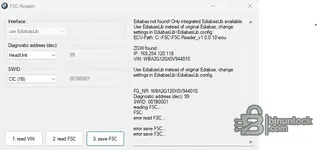
Turning off the firewall and running as administrator got a bit further. The read FSC button became active (not greyed out) but gave a read FSC error when clicked - see attached screeshot. In the config file snippet attached to my last post the ENET interface key is not commented out although there is a comment in the file where STD:OBD is specified.
 

Attachments

  • Screenshot 2026-02-17 161446.webp
    Screenshot 2026-02-17 161446.webp
    21 KB · Views: 68
Activity
So far there's no one here
Back